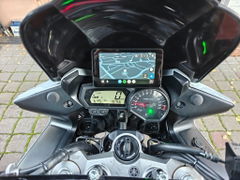
F5 Wire-Free Motorcycle CarPlay Screen


18% OFFYour Next Ride
TREAT
Gifts with qualifying purchases
Halloween offer details
18% off at checkout: TREATNo subscription needed.
- Free K3 work light2+ paid items & US$200+ in merchandise after discounts.
1 per order; replaces keychain. - Free keychain2+ paid items (accessories count).
1 per order unless eligible for K3. - Free screen protector1 matching protector per eligible display purchased:
C6 Pro, C3 Pro/Plus, C9 Pro/Pro Max, D6A.
Oct 1–31, 2026
Upgrade your ride. Skip the wiring.
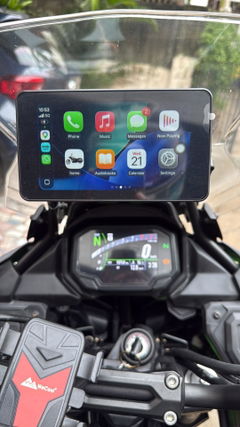
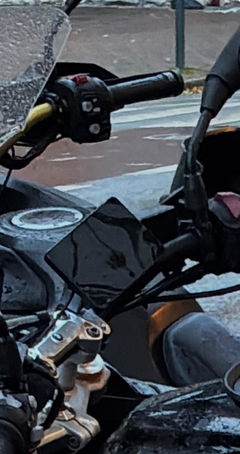
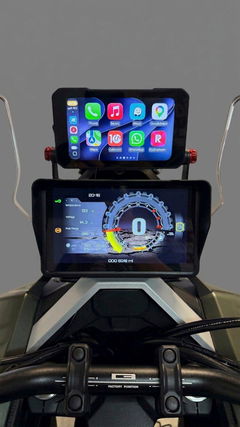
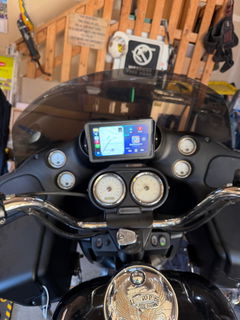
Add wireless Apple CarPlay and Android Auto to your motorcycle without connecting a screen to your bike’s electrical system. F5 runs on its own rechargeable battery, with a 5.5-inch touchscreen that supports both landscape and portrait use.
Charge it through USB-C, secure the included mount, and pair your compatible phone.
Built-in battery. No bike power wiring.
F5’s built-in 5,000 mAh battery powers the screen independently. There is no need to route a power cable to your motorcycle’s battery for battery-powered operation.
Expect approximately 10 hours of active use per charge—not standby time. Actual runtime varies with screen brightness and use. A full charge takes approximately 6 hours using the USB-C charging port.
Wireless CarPlay & Android Auto
Connect a compatible iPhone through wireless Apple CarPlay or a compatible Android phone through wireless Android Auto.
Bring supported navigation, music, calling and messaging functions to a dedicated handlebar screen. Follow directions on an unfamiliar route, access compatible audio apps, or keep communication controls within the connected-phone interface.
Available apps and functions depend on your phone, region, permissions and audio setup. Some services require mobile data or a subscription. Navigation uses your phone’s positioning; F5 does not have built-in GPS.
Landscape or portrait. Your choice.
Use F5 horizontally or vertically to suit your cockpit layout and viewing preference. Both orientations are supported on the same screen.
Set the screen position and viewing angle before riding.
A 5.5-inch touchscreen that adapts to changing light
The IPS touchscreen has a resolution of 1440 × 720 px, with an anti-glare surface treatment and glove-touch support.
Automatic brightness adjustment responds to surrounding light. You can also switch automatic adjustment off and set brightness manually.
IP67 dust & water resistance
The F5 main unit is rated IP67 for dust and water resistance.
Mounting hardware included
Both F5 packages include a ball-joint handlebar mount for adjustable screen positioning.
The included clamp is specified for mounting diameters of 12–25.4 mm. Measure your intended mounting point and check clearance around the screen, handlebars and controls before ordering.
Choose your TPMS package
No TPMS
Includes the F5 display, mounting hardware and charging cable, without tire pressure sensors.
With TPMS
Adds two external sensors for front and rear tire pressure and temperature monitoring. View pressure in bar or psi and temperature in °C or °F, with configurable high and low pressure thresholds.
Tire pressure sensors are included only with the With TPMS package. Select this package at checkout if you want the supplied sensor kit.
Getting started
- Charge F5 using the included USB-A to USB-C charging cable.
- Secure the mount to a compatible mounting point and adjust the viewing angle.
- Connect your phone: enable Bluetooth and Wi-Fi, then follow F5’s pairing prompts.
- Set up helmet audio: if using a Bluetooth helmet headset, pair it separately with your phone.
Complete setup before riding and stop safely before changing settings.
Key specifications
Display & controls
| Specification | Details |
|---|---|
| Display | 5.5 in IPS capacitive touchscreen |
| Resolution | 1440 × 720 px |
| Screen orientation | Landscape and portrait |
| Brightness adjustment | Automatic and manual |
| Touch operation | Glove-touch support |
Battery & charging
| Specification | Details |
|---|---|
| Battery capacity | 5,000 mAh |
| Battery runtime | Approximately 10 h of active use per charge |
| Full charging time | Approximately 6 h |
| Charging port | USB-C |
Connectivity
| Specification | Details |
|---|---|
| Phone connection | Wireless Apple CarPlay and Android Auto |
| Bluetooth | 5.2 |
| Wi-Fi | 2.4 GHz and 5 GHz |
Protection
| Specification | Details |
|---|---|
| Main unit dust & water resistance | IP65 |
Size & mounting
| Specification | Details |
|---|---|
| Dimensions | 142 mm × 78 mm × 18 mm |
| Main unit weight | 0.27 kg |
| Included clamp range | 12–25.4 mm |
What’s in the box
Included with both packages
- F5 display
- Handlebar clamp kit with three spacers, an anti-slip pad and a hex key
- Double-socket arm with its own hex key
- Double-ball adapter
- USB-A to USB-C charging cable
Additional items with the With TPMS package
- Front and rear tire pressure/temperature sensors
- Two sensor lock nuts
- Sensor wrench
Questions before you buy
Does F5 need a connection to my motorcycle battery?
No. F5 operates from its built-in rechargeable battery. Recharge it through USB-C between uses; battery-powered operation does not require a connection to your motorcycle’s electrical system.
Can F5 navigate without a phone?
F5 is designed to display compatible phone functions through CarPlay or Android Auto. It does not have built-in GPS; projected navigation uses your connected phone.
How do I connect my helmet headset?
Pair your Bluetooth helmet headset with your phone. Your phone connects separately to F5. F5 does not pair directly with the helmet headset.
Will it fit every motorcycle?
Fit depends on the available mounting point, its diameter and clearance around the screen and controls. The included clamp is specified for diameters of 12–25.4 mm. Check your motorcycle’s mounting space before ordering.
Service & support
Order Tracking & Processing
We process orders within 1–2 working days. Shipping details are sent after dispatch, and the tracking number may follow 1–2 working days after the first shipping notification. Follow your delivery on our Tracking Page.
Warranty & Product Support
Every Aoocci product is backed by a 1-Year Limited Warranty. If you run into a product-quality issue during the first year, our support team is ready to help. See the full Warranty Policy.
60-Day Satisfaction Guarantee
Not the right fit? You can return the item within 60 days of purchase. Check the steps and conditions in our Refunds & Returns Policy.
Order Changes & Cancellations
Need to change or cancel an order? Contact support within 5 hours of placing it and before the package has shipped. Once an order has been completed and dispatched, it can no longer be cancelled.
Shipping Costs & Timelines
Delivery times and shipping costs vary by destination. For the latest regional details, visit our Shipping Policy.