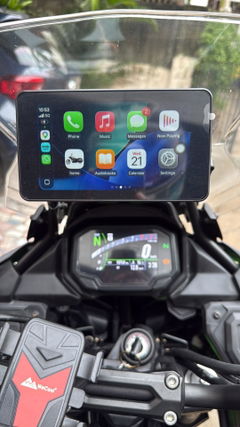
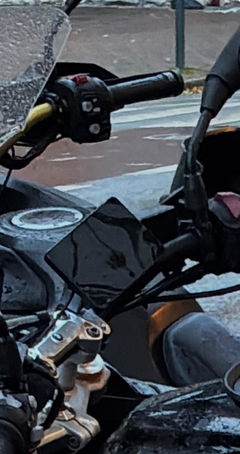
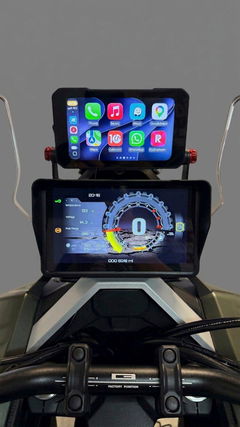
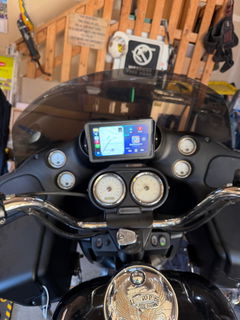
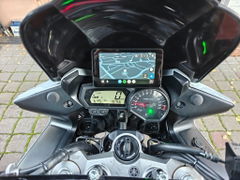
F5 Wire-Free Motorcycle CarPlay Screen


18% OFFYour Next Ride
TREAT
Gifts with qualifying purchases
Halloween offer details
18% off at checkout: TREATNo subscription needed.
- Free K3 work light2+ paid items & US$200+ in merchandise after discounts.
1 per order; replaces keychain. - Free keychain2+ paid items (accessories count).
1 per order unless eligible for K3. - Free screen protector1 matching protector per eligible display purchased:
C6 Pro, C3 Pro/Plus, C9 Pro/Pro Max, D6A.
Oct 1–31, 2026
CarPlay for your ride. No bike wiring.
Bring wireless Apple CarPlay and Android Auto to your handlebar. F5 runs on its own built-in battery, so you can leave your motorcycle’s power wiring alone.
Charge the screen, fit the included mount and connect your phone. No connection to the bike’s battery is needed for battery-powered use.

Wireless CarPlay & Android Auto
Your route, on the handlebar.
Follow the next turn or find a fuel stop using familiar navigation apps from your connected phone, with the route displayed on F5.
Music, podcasts, calls and supported messaging and voice features are part of the connected CarPlay or Android Auto experience through compatible phone apps.
App and voice-feature availability depends on your phone, region, permissions and audio setup. For helmet audio, pair your Bluetooth headset with your phone.

Power without the wiring job
Charge it. Mount it. Ride.
The built-in 5,000 mAh battery provides approximately 10 hours of use. Recharge through USB-C when you’re ready for the next ride.

-
Charge the screen
Use the included USB-to-USB-C charging cable. A full charge takes about 6 hours.
-
Fit the mount
Secure the included ball-joint mount to a compatible handlebar and set a comfortable viewing angle.
-
Connect your phone
Enable Bluetooth and Wi-Fi, then follow F5’s prompts to connect CarPlay or Android Auto.
Battery runtime is approximate and varies with use. “No bike wiring” refers to battery-powered operation; the battery still needs recharging.
Your phone connects the experience
Connect the screen. Set up your audio.
Connect an iPhone for Apple CarPlay or a compatible Android phone for Android Auto, then set up your helmet audio separately.
Phone to F5
Enable Bluetooth and Wi-Fi on your phone and follow F5’s pairing prompts. Your phone supplies compatible apps and navigation positioning.
Phone to helmet
Pair your Bluetooth helmet headset with your phone. The phone handles this audio connection; F5 does not pair directly with the helmet.
5.5 in IPS touchscreen
A screen that adapts to your ride.
A 1440 × 720 display brings your connected phone interface onto a dedicated motorcycle screen, with automatic brightness adjustment as the surrounding light changes.
Automatic or manual brightness
Use the ambient-light sensor, or switch automatic adjustment off and set brightness yourself.
Glove-compatible touch
A capacitive touchscreen with glove-touch support and an anti-glare surface treatment.

Landscape & portrait
Choose the view that fits.
F5 supports both landscape and portrait screen orientations, giving you a choice of display layout for your riding setup.

Ball-joint handlebar mount included
Set the angle. Keep the view.
The ball-joint mount lets you position F5 for your riding setup. The included clamp is specified for handlebar diameters of 12–25.4 mm.
Adjustable positioning
Use the ball-joint connections to set the screen angle before riding.
Check your mounting space
Measure the handlebar diameter at the intended mounting point and check clearance around the screen and controls.

Choose your TPMS option
Tire information, if you want it.
Choose the With TPMS option to view tire pressure and temperature on F5. Pressure can be shown in bar or psi, and temperature in °C or °F.
Front and rear pressure alert settings let you configure high and low pressure thresholds.
Tire pressure sensors are included only with the With TPMS option.

In the box
What comes with F5.
Both options include the F5 display, the mounting components and a USB-A to USB-C charging cable.
- F5 display
- Handlebar clamp kit: clamp with ball, three handlebar spacers, anti-slip pad and hex key
- Double-socket arm with its own hex key
- Double-ball adapter
- USB-A to USB-C charging cable
Optional TPMS kit
Included with the With TPMS option only: front and rear tire pressure/temperature sensors, two lock nuts and a wrench.

The details that matter
F5 specifications
Display & controls
| Screen | 5.5 in IPS |
|---|---|
| Resolution | 1440 × 720 px |
| Touch | Capacitive; glove-touch support |
| Brightness adjustment | Automatic and manual |
| Orientation | Landscape and portrait |
Power & charging
| Battery capacity | 5,000 mAh |
|---|---|
| Battery energy | 18.5 Wh |
| Battery life | Approximately 10 h |
| Full charge | About 6 h |
| Charging port | USB-C |
Connections & TPMS
| Phone connection | Wireless Apple CarPlay and Android Auto |
|---|---|
| Bluetooth | 5.2 |
| Wi-Fi | 2.4 GHz and 5 GHz |
| TPMS option | Pressure and temperature monitoring |
| TPMS units | bar / psi; °C / °F |
Size & mounting
| Dimensions | 142 mm × 78 mm × 18 mm |
|---|---|
| Main unit weight | 0.27 kg |
| Waterproof rating | IP67 |
| Mount type | Ball-joint handlebar mount |
| Clamp range | 12–25.4 mm |
| Mount included | Both TPMS options |
Before you choose
Questions about F5
Does F5 need wiring to my motorcycle’s battery?
No. F5 operates from its built-in battery, so battery-powered use does not require a connection to your motorcycle’s electrical system. Recharge the screen through USB-C between uses.
How long does the battery last?
Approximately 10 hours of use. A full charge takes about 6 hours. Runtime is approximate and varies with use.
Does F5 work with both iPhone and Android?
Yes. F5 supports wireless Apple CarPlay with a compatible iPhone and wireless Android Auto with a compatible Android phone. Enable Bluetooth and Wi-Fi and follow the screen’s connection prompts.
Can I connect my Bluetooth helmet headset?
Connect the headset to your phone, and connect the phone separately to F5. F5 does not connect directly to the helmet headset.
Are tire pressure sensors included?
Only with the With TPMS option. The No TPMS option does not include tire pressure sensors. Check the option selected before ordering.
Will the included mount fit my handlebar?
The included clamp is specified for handlebar diameters of 12–25.4 mm. Measure the intended mounting point and check that there is enough clearance for the screen and controls.
Does F5 have built-in GPS?
No. Navigation through CarPlay or Android Auto uses your phone’s positioning and compatible navigation apps.
Can I use the screen in portrait mode?
Yes. F5 supports both landscape and portrait screen orientations.
Here when you need us
Service & support
Order information, product support and the policies behind your purchase.
Order Tracking & Processing
Warranty & Product Support
60-Day Satisfaction Guarantee
Order Changes & Cancellations
Shipping Costs & Timelines