

How to watch YouTube on CarPlay
Recently, during the Olympic Games period, every time I get into the car after work, I really don't want to get out. I start the engine, quickly connect my phone to CarPlay, and open YouTube. I just want to enjoy the passion and excitement of the Olympics in this small space inside the car.
However, due to safety considerations, Apple officially does not support directly watching YouTube videos on the Apple CarPlay, which aims to provide a safe and undistracted driving experience, so video playback is restricted to prevent drivers from being distracted.
Nevertheless, if you, like me, still want to watch YouTube videos when the vehicle is stationary, in this article, I will provide you with two methods and analyze the pros and cons of each for your consideration.
Method 1: Jailbreak and Install Plugins:
After completing the aforementioned operations of jailbreaking and installing the carbridge plugin to lift the restrictions of Apple CarPlay. However, jailbreaking may affect the phone's warranty and the operation is relatively complex. The specific steps vary depending on the iOS version and the jailbreak tool used.
For example, the steps for using the checkra1n jailbreak software are roughly as follows:
- Download the jailbreak tool and install it.
- Connect the iPhone to the computer via a transmission line, open checkra1n and follow the prompts to enter DFU mode for jailbreaking.
- After the jailbreak is completed, install Cydia, which is similar to a software download center for jailbreak programs.
- Add software sources in Cydia, then search for, purchase and install the carbridge plugin.
After completing the above-mentioned operations of jailbreaking and installing the carbridge plugin, the following steps may be required to use YouTube:
- Ensure that your iPhone is connected to the Internet, either via Wi-Fi or mobile data connection.
- Open the already installed carbridge plugin.
- Search for and click on the YouTube app icon within the plugin.
- Wait for the YouTube app to load and start.
- After entering the YouTube app, you can search, browse the videos you are interested in, and click to play and watch.
It should be noted that jailbreaking an iPhone to lift restrictions and installing plugins not officially certified by Apple may violate Apple's service terms, and may also bring security risks and stability issues. Moreover, the laws in some regions may also prohibit such behaviors.
Method 2: Use CarPlay Box
Third-party CarPlay boxes allow vehicles that don't originally support CarPlay to have similar functions through an external device. These boxes typically connect to the vehicle's USB port, communicate with the phone, show specific apps from the phone on the vehicle's display, and offer some interaction and control.
To watch YouTube on Apple CarPlay with a multimedia box, you need these:
- An iPhone with iOS 9 or later and a car that's compatible with wired CarPlay.
- A multimedia box that supports YouTube streaming and works with your car.
- A USB cable or wireless dongle to connect the box to the car's USB port.
- Wi-Fi or cellular connection for the Internet.
Once you have these, do the following to watch YouTube on Apple CarPlay with the multimedia box: (You can click here to go to YouTube to watch how our CarPlay box is used.)
- Put the multimedia box in the car's USB port using a USB cable or wireless dongle.
- Connect your iPhone to the box's wireless network or use your cellular data.
- Open the box's app on your iPhone and choose YouTube from the list.
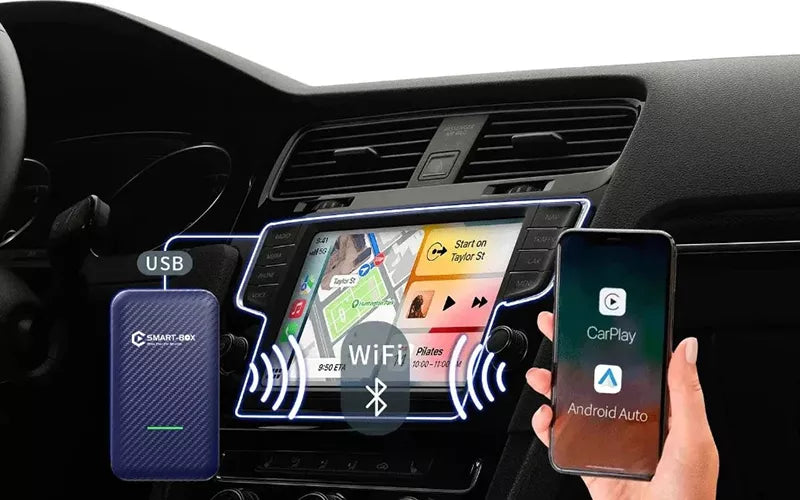
A CarPlay box with its own Android system is the classic way to do this — it runs the apps itself, so it is not limited to what your phone will project. Note on availability: the model this article originally recommended, the AI MAX Box, has since been discontinued, and the current Aoocci range does not include a box with a built-in Android system. What we do still sell are wireless projection adapters such as the WA18 — they make a wired CarPlay head unit wireless, but the apps still run on your phone, so phone-side video restrictions still apply. See the full adapter range to compare what is currently available.

Wrapping Up
I believe that by learning these methods, you will be able to watch the Olympic events or blogger videos you are interested in via CarPlay in the car! But, for driving safety, don't watch videos while driving!
